Customer Storefront
Self-serve orders
Stop juggling wholesaler searches, manually calculating price, art emails, and QuickBooks just to send one quote. EMBquote turns the whole back-and-forth into a guided wizard, pushes the estimate to QuickBooks automatically, and runs the job through production from the same dashboard.
14-day free trial · no credit card up front · built by a real embroidery shop using it every day
Every shop owner we talk to is doing the same five-step quote dance — and losing margin on every order to the time it takes.
EMBquote was built to fix all six. Here's how.
EMBquote is shop-management software for embroiderers. Wholesalers, your customers, QuickBooks, production, files, and email don't live in separate tabs anymore — they all flow through the same quoting engine, live and in sync.
One quote, built once — and it lands everywhere it needs to.
No retyping into QuickBooks.
 HubSpot
 Xero
Xero
 Zoho
FreshBooks
ShipStation
Zoho
FreshBooks
ShipStation
The wizard walks you (or your customer) through every choice a quote needs — decoration, garments, placements, customer, review, submit. No retyping, no spreadsheets, no surprises in QuickBooks.
Four ways to quote: embroidery, screen print, transfers, or contract decoration on garments your customer supplies. The wizard branches based on what you pick — embroidery asks where the logo goes and which threads, screen print asks how many ink colors and which placements, transfers ask for sheet size and quantity. You only see the questions that matter to your job.
8,377+ products from SanMar and S&S Activewear, refreshed nightly so prices and stock counts are never stale. The biggest unlock: filter to in-stock only — stop quoting a hoodie the wholesaler ran out of yesterday and stop the "oh sorry, that's backordered until October" follow-up email. Also filter by category, brand, color, fit, size range, and material. Or paste a cart from any other wholesaler (Charles River, Augusta, Alphabroder, anyone) and EMBquote prices the lines with your markup.
Pick colors, set quantities per size, pick placements per line. Upload the customer's logo once and it lives on their profile for the next order.
Start typing the customer's name. Existing customers autocomplete with their saved address, contact info, and logos. Brand-new customer? Type the name and add them inline — no need to leave the wizard. Repeat customers also carry their past pricing so you can match (or beat) the last quote they got.
Live price using your shop's quantity markup tiers. Adjust the cart however you need — change quantities, swap colors, drop in extra lines for rush fees, art fees, or setup charges. The total updates as you go.
Save as a quote (lands on the dashboard) or as an order. Either way, EMBquote creates the QuickBooks estimate and links it back to the job. Zero retyping.
Every quote on your dashboard has a live, editable cart. Search the catalog to add lines. Adjust quantity and unit price inline. Add per-line or order-level discounts with a required reason note. Stock badges show live availability per item.
Every quote lives in EMBquote first and QuickBooks second. Edit the cart, swap a color, change a quantity — nothing leaks into QuickBooks until you save. On save, EMBquote voids the prior estimate and creates a clean replacement. Your QuickBooks history stays accurate, and the voided trail stays attached to the job.
Every quote and order moves through a configurable stage workflow. Filter by stage, decoration method, rush, customer, or assignee. Click a row to open a job, change its stage, attach the .DST file, send a proof, or push the cart to QuickBooks. Nothing lives in a separate spreadsheet.
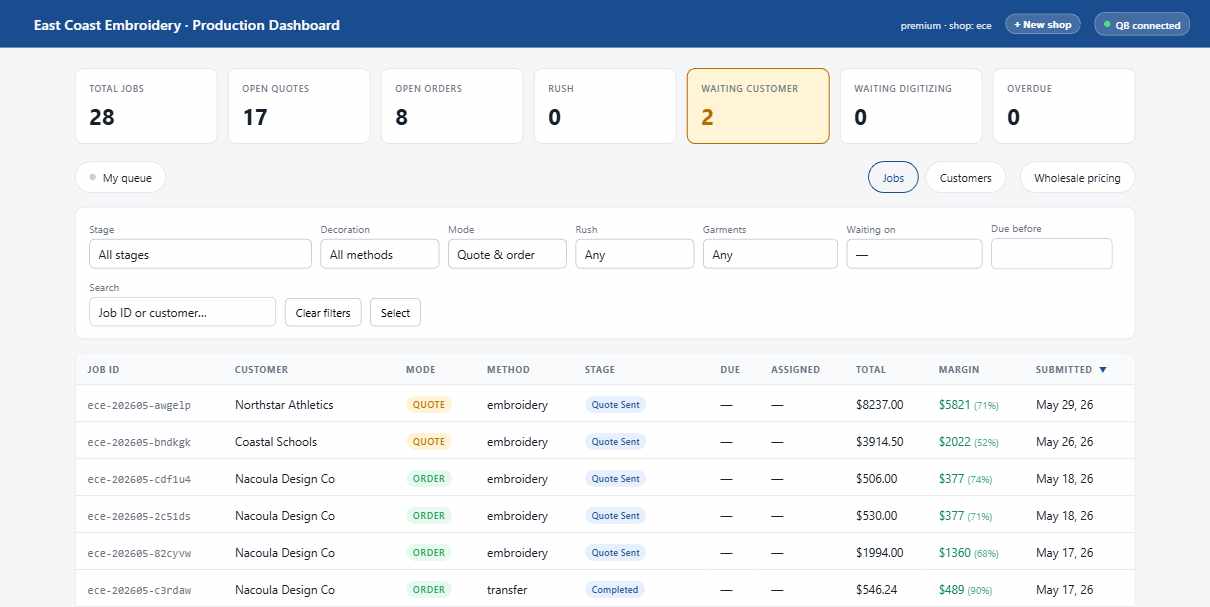
Every embroiderer gets their own personal view of the dashboard — only the jobs they're assigned to, with the same stage controls as the full board. Bookmark it on each machine and they each land on their own queue. One click rolls back to the full board when you need to triage across the shop.
Every Pro shop gets a customer-facing storefront on its own domain — same SanMar + S&S catalog the wizard uses, your branding, your headline, your markup. Repeat customers search, drop logos on each cart line, and check out. Every order lands on your production dashboard as a quote — you still get the final review before it becomes a real order. The example below is East Coast Embroidery's storefront; yours will look like your shop.
embquote.com/<your-slug> if you'd rather not bring a domain.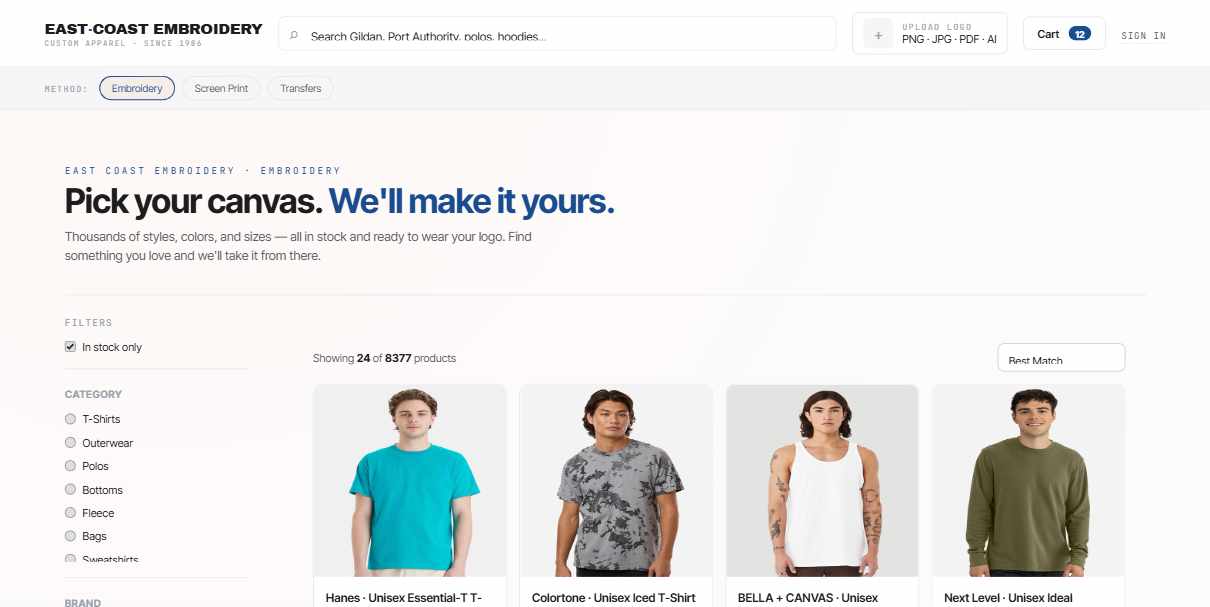
SanMar and S&S Activewear are the two largest blank-apparel wholesalers in North America — and EMBquote indexes both, live, in the same search bar. You're not locked into either, though: paste a screenshot of your cart from Charles River, Augusta, Alphabroder, S&K, or any other site and EMBquote reads the lines, prices them with your markup, and drops them into the quote.
Three pricing tiers per shop. Override any individual style up or down whenever you need to.
Every shop owner spends half their day in email — confirming orders, sending proofs, sharing tracking numbers, asking for payment. EMBquote ships with eight pre-written templates, each one pulling in the job's customer, line summary, total, and links. Pick the right template from the job page, give it a quick read, hit send.
Every template is on-brand, friendly, and personalized — the customer's name, the job number, the line summary, and the right link are all filled in for you. From the job page, pick the template you need, read the draft, send.
Every send is logged on the job page, so you can scroll back and see what was sent, when, and to whom. Proof approvals come back to the job too — when the customer clicks Approve, you see it on the dashboard.
Every job gets its own file shelf backed by Cloudflare R2. Drop .DST/.EMB digitized files, customer art, proofs, sewout photos, and shipping labels — all attached to the job, all available to your team.
Repeat customers' logos are saved to their profile so you can pull them up for the next order.
What's in the box today, and what's on deck.

Try Pro free for 14 days. No credit card up front. After the trial, pick the tier that matches your shop.
For shops just trying it out. Always free, with limits.
For working shops. Unlimited everything, two-way QBO, multi-user.
For multi-shop operations and custom integrations.
Most of these get asked on the first call. If yours isn't here, email hello@embquote.com.
EMBquote is embroidery quoting and shop-management software. It is a multi-tenant SaaS that lets embroidery shops browse SanMar and S&S Activewear catalogs, build quotes in a six-step wizard, push estimates to QuickBooks Online, and run production from one dashboard.
Most quotes take a few minutes. The wizard has six steps: pick a decoration method, search the catalog, configure sizes and placements, add a customer, review the cart, and submit. The estimate is pushed to QuickBooks automatically.
Yes. EMBquote has two-way QuickBooks Online sync. When you save a quote it creates a QuickBooks estimate. When you edit the cart and save again, EMBquote voids the old estimate and creates a clean replacement — your QuickBooks history stays accurate, and the voided trail stays attached to the job.
Invoices include a QuickBooks Payments "View & pay invoice" link so customers can pay online.
EMBquote ships with live SanMar and S&S Activewear catalogs. Other wholesalers — Charles River, Blue Generation, Augusta — can be added as "Other Wholesaler" line items where you paste a cart and EMBquote prices them using your shop's markup tier. We add more direct catalog integrations as shops ask for them.
Yes. EMBquote includes a customer-facing storefront at the root of your domain. Customers search the catalog, configure decoration on each cart line, upload a logo, and check out. Every order lands on your production dashboard as a quote for your review before it becomes a real order.
Every quote and order moves through a configurable stage workflow: On Hold → In Progress → Ready. Filter by stage, decoration, rush, or assignee. Embroiderers can switch to "My Queue" with one click to see only the jobs assigned to them. Each job has its own page with art files, sewout photos, customer emails, and the editable cart.
Hold-and-review is the safety net. When you edit a quote that already has a QuickBooks estimate, the changes are staged in EMBquote's cart until you click "Save changes → push to QuickBooks." On save, EMBquote voids the old estimate and creates a clean new one. The voided history stays attached to the job, so you can always see what changed and when.
Think of it like Printful-style draft orders: nothing leaks into QuickBooks until you commit.
Yes. Every new shop gets a 14-day free trial of the Pro tier — no credit card required up front. After 14 days you pick Starter (free, limited), Pro ($49/month), or Enterprise.
EMBquote was built by the owner of East Coast Embroidery, a working embroidery shop in Rhode Island that's been decorating apparel since 1986. Every off-the-shelf shop-management tool we tried either ignored QuickBooks, ignored production, or was built for sign shops and screen printers who don't think about digitizing or sewouts. So we built the thing we actually wanted to use. East Coast Embroidery is the founding tenant — we run the entire shop on it, every day.
We've been running East Coast Embroidery — a working embroidery and decorated-apparel shop in Rhode Island — since 1986. Every off-the-shelf shop-management tool we tried either ignored QuickBooks, ignored production, or was built for sign shops and screen printers who don't care about digitizing or sewouts.
So we built the thing we wanted to use. We run on it every day. If it works for us, it'll probably work for you.
— East Coast Embroidery
Try Pro free for 14 days. Wizard, dashboard, two-way QuickBooks sync, customer storefront. No credit card up front.
14-day free trial·No credit card up front·Cancel anytime·Built in Rhode Island